Ribbon Command Search
 BCGControlBar Pro (MFC)
 BCGSuite (MFC)
BCGControlBar for .NET
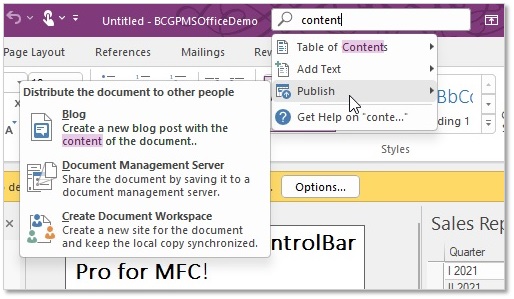
The functionality of the ribbon search box is very similar to the Office 2016-2024 "Tell Me." You can easily add a command search to the ribbon bar caption or tabs row. When the user types the text in this edit box, the framework automatically displays a drop-down menu with the commands that match the search criteria. So, this component provides an easy way to locate and invoke the desired command very quickly, without looking through all the ribbon tabs.
The developer can also add custom commands to the results drop-down menu, such as displaying online help for the text entered.
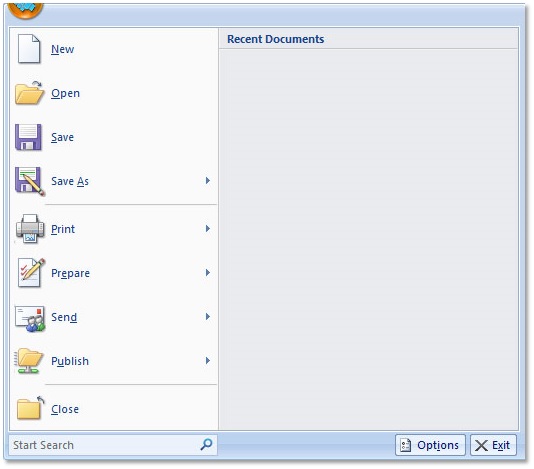
If your application has a ribbon main menu (like Office 2007 applications), you can add the commands search box to the bottom of this menu.
Office 2022-like "Tell Me":
Ribbon Main panel with command search box:
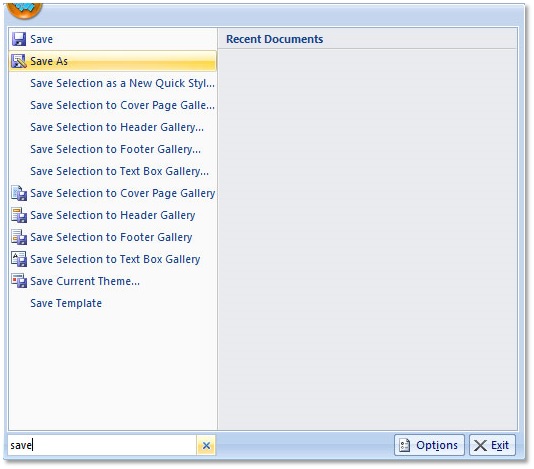
Ribbon Main panel search results:
Sample code:
// Enable Ribbon "Tell me":
m_wndRibbonBar.EnableCommandSearch();

// Enable Ribbon Main panel command search:
CBCGPRibbonMainPanel* pMainPanel;
pMainPanel->EnableCommandSearch(
    TRUE, _T("Start Search"), _T("Q"),
    200 /* Width */);