Ribbon Panels (Groups)
 BCGControlBar Pro (MFC)
 BCGSuite (MFC)
BCGControlBar for .NET
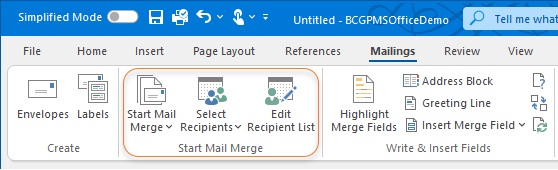
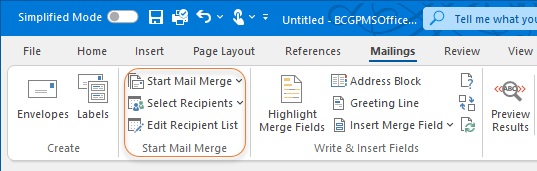
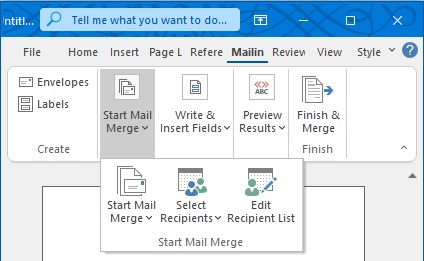
Each Microsoft Office-style ribbon panel contains one or more ribbon controls. The control position will be automatically calculated according to the panel size to provide the best fit and utilize the free panel space. If there is no space available for all controls, the panel will contain one menu button, and when the user clicks on it, a popup panel appears under the ribbon panel.
All elements have full size:
Panel in compact mode:
Panel is replaced by popup menu:
Sample code:
CBCGPRibbonCategory* pCategory = m_wndRibbonBar.AddCategory (
	_T("Home"),
	IDB_WRITE,
	IDB_WRITELARGE);

// Create "Clipboard" panel:
CBCGPRibbonPanel* pPanelClipboard = pCategory->AddPanel (
	_T("Clipboard"), hIconClipboard);