Masked Edit Control
 BCGControlBar Pro (MFC)
 BCGSuite (MFC)
BCGControlBar for .NET
The masked edit control extends the functionality of the Windows edit box. The masked edit control is able to validate typed characters against the specified mask and display them according to the specified template. You can define your own mask for the telephone number, serial number, or other display data, as well as the default string that will be displayed. You can put a restriction on the usage of defined characters. The control converts lowercase letters into uppercase and vice versa, as the standard edit control does.
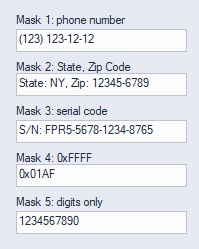
Sample code:
CBCGMaskEdit m_wndPhoneNumber;
...
m_wndPhoneNumber.EnableMask(
		_T(" ddd  ddd dd dd"),	// The mask string
		_T("(___) ___-__-__"),	// Literal, "_" char = character entry
		_T(' '));				// Default char
m_wndPhoneNumber.SetValidChars(NULL);	// Valid string characters
m_wndPhoneNumber.SetWindowText(_T("(123) 123-12-12"));