Menu Button (Split Button)
 BCGControlBar Pro (MFC)
BCGSuite (MFC)
 BCGControlBar for .NET
The menu button provides the functionality of a control that shows a popup menu when clicked and redirects the selected command to the parent. The menu button has a special "pressed" state. The popup menu may appear from the right or bottom side of the button. In addition, this control can be created as a split button: when the user clicks the drop-down arrow, the popup menu is displayed, but when the click occurs on the left (top) side, the button click notification is sent to the parent window, and no menu is opened.
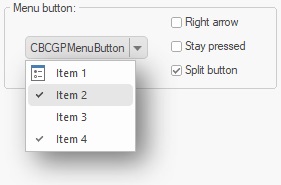
Sample code:
CBCGPMenuButton button;
...
button.SetupMenu(IDR_MENU);