Let's assume that you have an old (legacy) GUI control that needs to be updated to be visually theme-aware. Assuming that your code is using the standard Windows colors and you need to replace them with the currently selected theme colors. Please consider using the grid below to replace your GetSysColor calls with the theme colors:
GetSysColor(COLOR_BTNFACE)
globalData.clrBarFace
GetSysColor(COLOR_BTNSHADOW)
globalData.clrBarShadow
GetSysColor(COLOR_3DDKSHADOW)
globalData.clrBarDkShadow
GetSysColor(COLOR_3DLIGHT)
globalData.clrBarLight
GetSysColor(COLOR_BTNHIGHLIGHT)
globalData.clrBarHilite
GetSysColor(COLOR_BTNTEXT)
globalData.clrBarText
GetSysColor(COLOR_WINDOW)
CBCGPVisualManager::GetInstance()->GetControlFillColor()
GetSysColor(COLOR_WINDOWTEXT)
CBCGPVisualManager::GetInstance()->GetControlTextColor()
GetSysColor(COLOR_HIGHLIGHT)
CBCGPVisualManager::GetInstance()->GetHighlightedColor(0)
For example, your custom control has the following WM_PAINT message handler source code:
void CMyButton::OnPaint()
{
	CPaintDC dc(this); // device context for painting

	CRect rectClient;
	GetClientRect(rectClient);

	dc.FillSolidRect(rectClient, ::GetSysColor(COLOR_BTNFACE));
	dc.Draw3dRect(rectClient, ::GetSysColor(COLOR_3DLIGHT), ::GetSysColor(COLOR_BTNSHADOW));

	CString strText;
	GetWindowText(strText);

	dc.SetTextColor(::GetSysColor(COLOR_BTNTEXT));
	dc.SetBkMode(TRANSPARENT);

	CFont* pOldFont = dc.SelectObject(GetParent()->GetFont());
	dc.DrawText(strText, rectClient, DT_SINGLELINE | DT_CENTER | DT_VCENTER);
	dc.SelectObject(pOldFont);
}
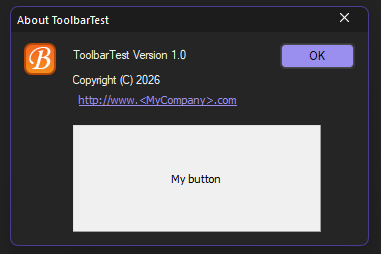
The control looks good in the standard Windows theme and other light themes but is not matched to the application's dark themes:
Let’s modify the source code using the grid above:
void CMyButton::OnPaint()
{
	CPaintDC dc(this); // device context for painting

	CRect rectClient;
	GetClientRect(rectClient);

	dc.FillSolidRect(rectClient, globalData.clrBarFace);
	dc.Draw3dRect(rectClient, globalData.clrBarLight, globalData.clrBarShadow);

	CString strText;
	GetWindowText(strText);

	dc.SetTextColor(globalData.clrBarText);
	dc.SetBkMode(TRANSPARENT);

	CFont* pOldFont = dc.SelectObject(GetParent()->GetFont());
	dc.DrawText(strText, rectClient, DT_SINGLELINE | DT_CENTER | DT_VCENTER);
	dc.SelectObject(pOldFont);
}
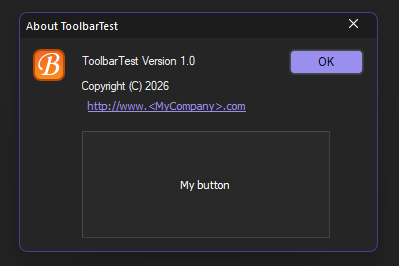
And control colors are matched to the current visual theme:
Additionally, please add the BCGM_CHANGEVISUALMANAGER registered message handler to your control to ensure it redraws when the visual theme changes:
afx_msg LRESULT OnChangeVisualManager(WPARAM, LPARAM);
DECLARE_MESSAGE_MAP()
...
BEGIN_MESSAGE_MAP(CMyButton, CWnd)
	ON_REGISTERED_MESSAGE(BCGM_CHANGEVISUALMANAGER, OnChangeVisualManager)
END_MESSAGE_MAP()

LRESULT CMyButton::OnChangeVisualManager(WPARAM, LPARAM)
{
	RedrawWindow();
	return 0L;
}
Back to the Developer Area